> For the complete documentation index, see [llms.txt](https://intelliauth.cymmetri.io/llms.txt). Markdown versions of documentation pages are available by appending `.md` to page URLs; this page is available as [Markdown](https://intelliauth.cymmetri.io/api-specification/registration-process-flow.md).
# Registration Process Flow
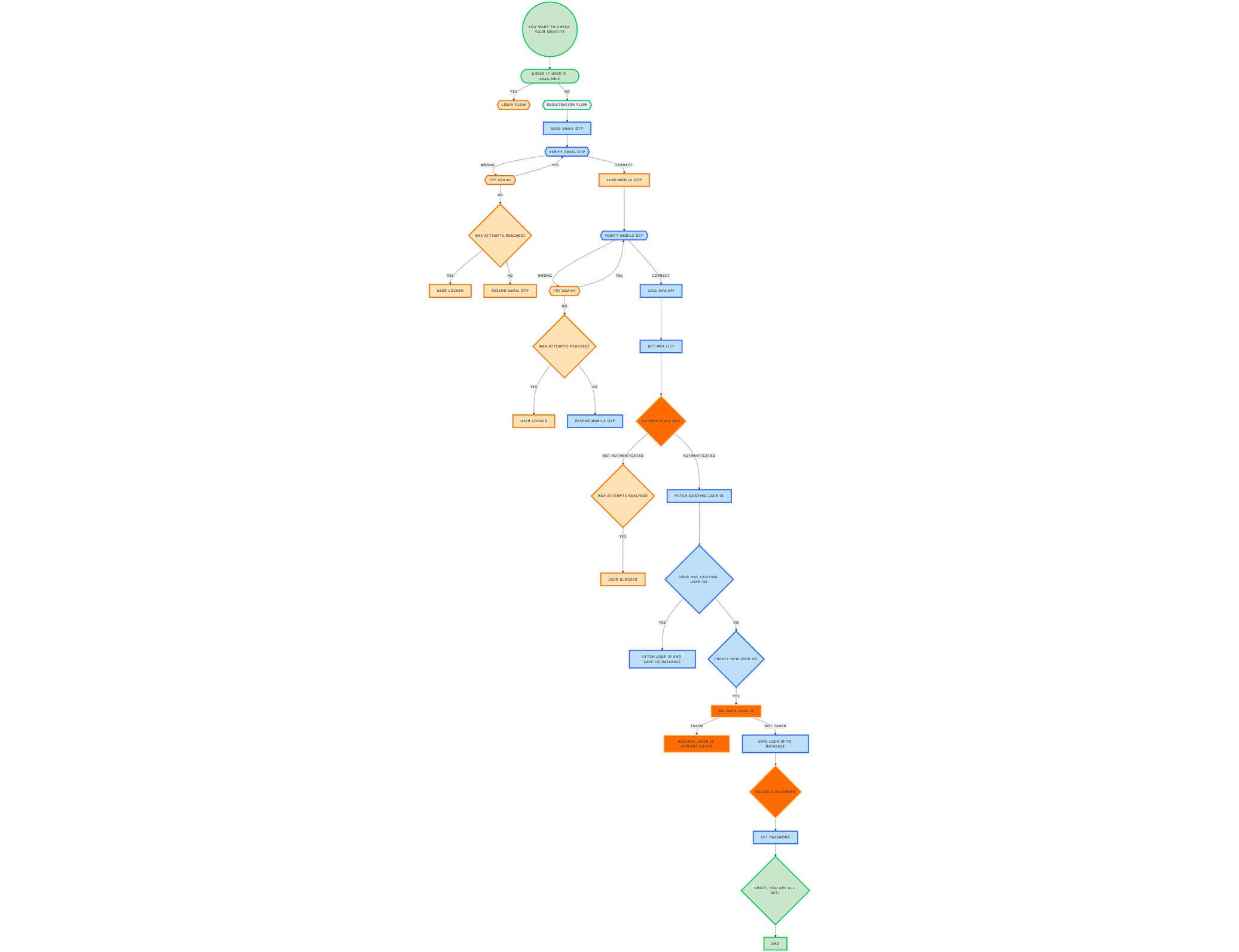
Following are the service’s endpoints to be implemented to complete the registration process.
**1. Check Identity (ciamregsrvc/webRegistration/checkIdentity)**
This endpoint checks whether the User is available in Cymmetri Database with following scenarios:
* Check User in Cymmetri Database
* Query the Cymmetri database using the user details.
* If the user is found, initiate the login flow.
* If the user is not found, proceed to the next step.
Else, user will be checked in the CBS with the keeping following scenarios in consideration
* Query the Bank database using the user details.
* If the user is found, trigger the registration flow.
* Send an OTP (One-Time Password) to the user's registered email.
* If the user is not found, proceed to the next step.
IF neither cymmetri nor bank holds this user, then the following action will be performed
* send a response indicating invalid data/user does not exist.
{% openapi src="/files/EHE8RaZp1ZWIsWP9UaUw" path="/webRegistration/checkIdentity" method="post" %}
[swagger.yaml](https://1897422846-files.gitbook.io/~/files/v0/b/gitbook-x-prod.appspot.com/o/spaces%2FAqdGCEwpNMRjDgEmGpJM%2Fuploads%2FbGP3c0lfnyxPsTrmJRMT%2Fswagger.yaml?alt=media\&token=708c25fa-cd8b-4bb2-9f68-a6773cc364d1)
{% endopenapi %}
**2. Verify Email OTP (ciamregsrvc/webRegistration/VerifyEmailOtp)**
Email OTP Verification Steps:
* Sending Email OTP: Generate and send an OTP to the user’s email in the registration step.
* Verifying Email OTP: When a user submits the OTP, it needs to be verified.
If Email OTP is Correct:
* Move to the next step and send a mobile OTP.
If Email OTP is Incorrect:
* Track attempts.
* If the user reaches the maximum number of attempts allowed, block the user.
{% openapi src="/files/EHE8RaZp1ZWIsWP9UaUw" path="/otp/verifyOtp" method="post" %}
[swagger.yaml](https://1897422846-files.gitbook.io/~/files/v0/b/gitbook-x-prod.appspot.com/o/spaces%2FAqdGCEwpNMRjDgEmGpJM%2Fuploads%2FbGP3c0lfnyxPsTrmJRMT%2Fswagger.yaml?alt=media\&token=708c25fa-cd8b-4bb2-9f68-a6773cc364d1)
{% endopenapi %}
**3. Resend OTP Email (ciamregsrvc/webRegistration/resendOtpEmail)**
If the user does not receive the OTP, they can request to resend it.
{% openapi src="/files/EHE8RaZp1ZWIsWP9UaUw" path="/webRegistration/resendOtpEmail" method="post" %}
[swagger.yaml](https://1897422846-files.gitbook.io/~/files/v0/b/gitbook-x-prod.appspot.com/o/spaces%2FAqdGCEwpNMRjDgEmGpJM%2Fuploads%2FbGP3c0lfnyxPsTrmJRMT%2Fswagger.yaml?alt=media\&token=708c25fa-cd8b-4bb2-9f68-a6773cc364d1)
{% endopenapi %}
**4. Verify Mobile OTP(ciamregsrvc/webRegistration/VerifyMobileOtp)**
Mobile OTP Verification Steps:
* Sending Mobile OTP: Generate and send an OTP to the user’s mobile in the verify email OTP step.
* Verifying Mobile OTP: When a user submits the OTP, it needs to be verified.
If Mobile OTP is Correct:
* Proceed to the next step.
If Mobile OTP is Incorrect:
* Track attempts.
* If the user reaches the maximum number of attempts allowed, block the user.
{% openapi src="/files/EHE8RaZp1ZWIsWP9UaUw" path="/webRegistration/VerifyEmailOtp" method="post" %}
[swagger.yaml](https://1897422846-files.gitbook.io/~/files/v0/b/gitbook-x-prod.appspot.com/o/spaces%2FAqdGCEwpNMRjDgEmGpJM%2Fuploads%2FbGP3c0lfnyxPsTrmJRMT%2Fswagger.yaml?alt=media\&token=708c25fa-cd8b-4bb2-9f68-a6773cc364d1)
{% endopenapi %}
**5. Resend OTP Mobile (ciamregsrvc/webRegistration/resendOtpMobile)**
If the user does not receive the OTP, they can request to resend it.
{% openapi src="/files/EHE8RaZp1ZWIsWP9UaUw" path="/webRegistration/resendOtpMobile" method="post" %}
[swagger.yaml](https://1897422846-files.gitbook.io/~/files/v0/b/gitbook-x-prod.appspot.com/o/spaces%2FAqdGCEwpNMRjDgEmGpJM%2Fuploads%2FbGP3c0lfnyxPsTrmJRMT%2Fswagger.yaml?alt=media\&token=708c25fa-cd8b-4bb2-9f68-a6773cc364d1)
{% endopenapi %}
**6. Get MFA LIST (ciamregsrvc/webRegistration/mfa/list)**
Fetch all the available MFA factors.
{% openapi src="/files/EHE8RaZp1ZWIsWP9UaUw" path="/webRegistration/mfa/list" method="get" %}
[swagger.yaml](https://1897422846-files.gitbook.io/~/files/v0/b/gitbook-x-prod.appspot.com/o/spaces%2FAqdGCEwpNMRjDgEmGpJM%2Fuploads%2FbGP3c0lfnyxPsTrmJRMT%2Fswagger.yaml?alt=media\&token=708c25fa-cd8b-4bb2-9f68-a6773cc364d1)
{% endopenapi %}
**7. Authenticate User (ciamregsrvc/webRegistration/authenticateUser)**
Authentication Steps:
* Authenticate user with available MFA factors like credit card, debit card.
* If the user entered correct details, proceed to the next step.
* If a user entered wrong details and reaches the maximum number of attempts allowed, block the user.
{% openapi src="/files/EHE8RaZp1ZWIsWP9UaUw" path="/webRegistration/authenticateUser" method="post" %}
[swagger.yaml](https://1897422846-files.gitbook.io/~/files/v0/b/gitbook-x-prod.appspot.com/o/spaces%2FAqdGCEwpNMRjDgEmGpJM%2Fuploads%2FbGP3c0lfnyxPsTrmJRMT%2Fswagger.yaml?alt=media\&token=708c25fa-cd8b-4bb2-9f68-a6773cc364d1)
{% endopenapi %}
**8. Fetch existing User Id (ciamregsrvc/webRegistration/existingUserId)**
Fetch user ID from the existing system (bank database if available).
{% openapi src="/files/EHE8RaZp1ZWIsWP9UaUw" path="/webRegistration/existingUserId" method="get" %}
[swagger.yaml](https://1897422846-files.gitbook.io/~/files/v0/b/gitbook-x-prod.appspot.com/o/spaces%2FAqdGCEwpNMRjDgEmGpJM%2Fuploads%2FbGP3c0lfnyxPsTrmJRMT%2Fswagger.yaml?alt=media\&token=708c25fa-cd8b-4bb2-9f68-a6773cc364d1)
{% endopenapi %}
**9. Save user id (ciamregsrvc/webRegistration/saveuserid)**
User can save a new user ID if it is not already in use.
{% openapi src="/files/EHE8RaZp1ZWIsWP9UaUw" path="/webRegistration/saveuserid" method="post" %}
[swagger.yaml](https://1897422846-files.gitbook.io/~/files/v0/b/gitbook-x-prod.appspot.com/o/spaces%2FAqdGCEwpNMRjDgEmGpJM%2Fuploads%2FbGP3c0lfnyxPsTrmJRMT%2Fswagger.yaml?alt=media\&token=708c25fa-cd8b-4bb2-9f68-a6773cc364d1)
{% endopenapi %}
**10. Validate Password (ciamregsrvc/webRegistration/validatePassword)**
· Validate if the password follows all the rules.
· If it does, move on to the next step.
· If it doesn't, the user needs to choose another password.
{% openapi src="/files/EHE8RaZp1ZWIsWP9UaUw" path="/webRegistration/validatePassword" method="post" %}
[swagger.yaml](https://1897422846-files.gitbook.io/~/files/v0/b/gitbook-x-prod.appspot.com/o/spaces%2FAqdGCEwpNMRjDgEmGpJM%2Fuploads%2FbGP3c0lfnyxPsTrmJRMT%2Fswagger.yaml?alt=media\&token=708c25fa-cd8b-4bb2-9f68-a6773cc364d1)
{% endopenapi %}
**11. Set Password: (ciamregsrvc/webRegistration/setIbPassword)**
· The user can set a password that meets all the password policy requirements.
{% openapi src="/files/EHE8RaZp1ZWIsWP9UaUw" path="/webRegistration/setIbPassword" method="post" %}
[swagger.yaml](https://1897422846-files.gitbook.io/~/files/v0/b/gitbook-x-prod.appspot.com/o/spaces%2FAqdGCEwpNMRjDgEmGpJM%2Fuploads%2FbGP3c0lfnyxPsTrmJRMT%2Fswagger.yaml?alt=media\&token=708c25fa-cd8b-4bb2-9f68-a6773cc364d1)
{% endopenapi %}